Search This Blog or the Web

Thursday, July 21, 2011

Nokia N9 is here!!


 Nokia had announced its new smartphone with new OS, MeeGo OS (Linux-based OS) and 1GHz Cortex A8 CPU with a bold, all screen beautiful design. It also equipped up with a stunning 3.9-inch capacitive AMOLED display with the protective Gorilla Glass and Anti-glare polariser.


Nokia N9 8-Megapixel with Carl-Zeiss lens simple camera

It also comes with 8-Megapixel Carl Zeiss optics camera with autofocus and dual LED flash.
And it comes with touch-focus and it can record 720p HD video with rate 30 frames per second (fps).


Nokia N9's simple bold design

It also comes with 16GB/64GB storage, and it also have Dolby Mobile sound enhancement; Dolby Headphone support, and SMS (threaded view) with the new predictive text input (Swype).


This video describes the speciality of the Swype's text input method. Personally, i think this is the fastest way to text.
that's all for today... till we meet again in the next post!!
thanks for reading!!!

Main Sources : GSM Arena and Nokia Malaysia

Windows XP : Facebook "Virus" solutions...

Hi guys,
Recently i posted the solution fo the new facebook virus, but it is for windows 7...
But today i will post the solution for Windows XP...
Okay, Lets Begin!


1 : Open "Start" menu and choose "Run"


2 : In the "Run" window, type : msconfig


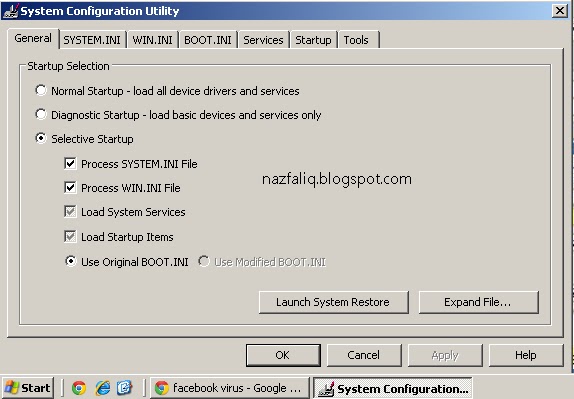
3 : So it will open the "System Configuration Utility" Window like this :


4 : Choose the "BOOT.INI" tab and if you are really "infected", it should be like this :


5 : Just untick the "/SAFEBOOT" till you see this :


6 : Click "OK" and Now, Restart your PC and i think it will be fine.. ^^

Wednesday, July 20, 2011

Facebook New Virus?? This is MY OWN solution...


Recently, there are new facebook virus that attacks alot of Facebook users... It is spreading via Facebook's IM (Instant Messaging a.k.a. chatbox), and it is started like this :

"Hi. How are you?"

you repiles...

"Wanna laugh? :)"

you replies...

"Is it you on the video? want to see?"

And it will send you a LINK and DO NOT click the link!!!
What? you already clicked it?
Dont worry, this is the solution...
If your computer automatically turned off and then it will start in safe mode, dont worry...
Just follow this step...
1 : Click "Start" button


2 : Search : msconfig


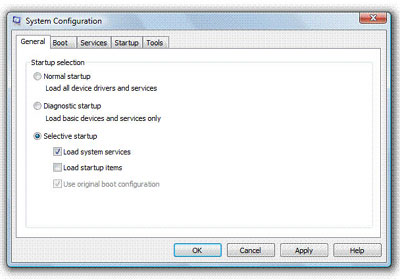
3 : Run it and it will be like this :


4 : Click on the "Boot" tab and if you are really "infected", it should be like this :


5 : Untick "Safe boot" until you see this :


6 : Click "OK" and then restart your PC...and its done!!!


Good luck in trying! any questions please message me via facebook...
Sharing is caring but PLEASE, DO NOT COPY!!
P/S : please tell others about this blog if there are encountered the same problem...
^^

Saturday, June 25, 2011

My Other Blog... Join Now...

i have another blog.. and this blog is my 2nd blog actually...
This is my first blog link : http://nazirstuffs.blogspot.com

This Blog has lots of funny pictures... less word posting...
Join Now !! thanx.. ^^

P/S : i have changed my phone to Nokia 5800 XpressMusic...
there will be a review for it soon since i changed it to Nokia C6 firmware.. ^^ 

Monday, March 21, 2011

Facebook Shortcut keys.. ^^

Do you know there is hidden shortcut keys on Facebook when you open Facebook in your browser??


Follow these steps :


For Windows + Google Chrome = Alt + (The shortcut key on the list below)

For Windows + Firefox = Alt + Shift + (The shortcut key on the list below)

For Windows + IE = Alt + (The shortcut key on the list below)

For Mac OS + Firefox = Function + Ctrl + (The shortcut key on the list below)

For Mac OS + Safari = Option + Ctrl + (The shortcut key on the list below)


M - Open a new message 

? - Go to the Facebook Search 

1 - Home (News Feed)

2- Your profile page

3 - Friend requests

4 - Messages

5 - Notifications

6 - Your Account Settings

7 - Your Privacy Settings

8 - Go to the Facebook page

9 - View Facebook Statements and Rights agreement

0 - Open Facebook help center


*For Example, i use Google Chrome Browser On my Windows 7 to open my Facebook.
  So, if i want to compose a new mail, i simply press ALT + M and a mail compose window will appear.. ^^

*For Internet Explorer, after pressing Alt + # let go of both keys and press Enter for the shortcut to work. For example, press Alt + 1 (let go) and then press Enter to open the Facebook home page. Also, the M to open a new message in Internet Explorer does not work, because it is the home shortcut.


Okay guys, this info is for this post... hope this helps...
Thank you.. ^^

Thursday, March 17, 2011

My Gadgets Review.. ^^ (Part 1)

Ok, This is my first post in This blog.. as the title stated above, i will review my own gadgets that are :
Camera : Samsung PL 101 (Part 2)
PC : HP Mini 110 (Part 2)
Cellphone : Sony Ericsson S312
MP3 Player : Apple iPod Shuffle 2GB Personalized

Ok, Begin With my beloved MP3 Player, iPod Shuffle.


As you guys know, this is the CHEAPEST Apple gadgets in the world... Why i made up my mind buying this? Because im in love with Apple's sound quality... I know that Sony's Walkman have a very good bass, but the bass is not a must for me... the sound's superb clarity is good enough for me...

My iPod Shuffle....personalized with engraving... ^^
It also has 10 hours of battery life, a Voice-Over button that spoke out the song's title and battery status, and i LikE it.. ^^ Well, the engraving is the main reason i love my iPod...^^ i feel a sense of belonging when i see this text...^^
Maybe im a Apple lover rite now.. ^^


My Cellphone : Sony Ericsson S312.. ^^
To tell you guys the truth, this is a free phone...^^  I got it as a free gift when im at Form 4 in my high school in Canteen's Day Coupon Selling Event.. Thank God, i was the winner and i got this beautiful phone...

SE S312...Front View

First impression that crossed in my mind when i look at this phone... WTF? this is a girl's phone... T.T"... but after looked it in many sides, i find that is phone is gorgeous...^^ and i decided to use it around 3 years before i upgrade to new phone...NOTE : both photo is the latest photo after i used it massively since 3years ago.. ^^

SE S312.. Back View...
This Phone has a 2 Megapixel Camera, which is kinda good, but the laggy makes this phone suck. This phone always hang when two messages at same time received, no 3rd party theme + games supported and i can't stand it anymore.. T.T"... Maybe in two months time, i plan to upgrade my phone..^^ To check this phone spec and user's comment and review, please click here

That's all for my first post, stay tuned for Part 2...^^

Drop your comments here.. ^^